


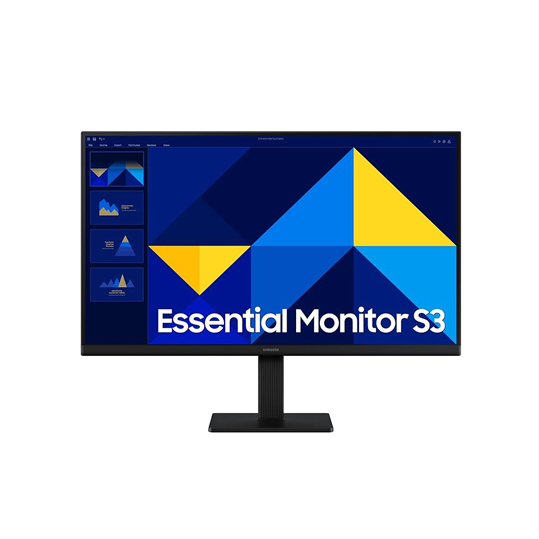
Samsung LED 24 Essential Monitor S3 S30GD Full HD Monitor
If you’re looking for a reliable, affordable, and high-quality display, the Samsung LED 24 Essential Monitor S3 S30GD Full HD Monitor is an excellent choice in 2025. This 24-inch monitor is designed to meet the needs of a wide range of users—from professionals who require clear visuals for work to casual gamers and entertainment enthusiasts seeking an immersive viewing experience. With its Full HD resolution, LED backlighting, and energy-efficient design, the S3 S30GD delivers crisp, vibrant visuals without breaking the bank.
In this guide, we’ll explore the key features, design, performance, and value of this monitor, helping you decide whether it’s the right fit for your home or office setup.
Key Features of the Samsung LED 24 Essential Monitor S3 S30GD
-
Full HD Display (1920 x 1080)
The monitor features a Full HD resolution, providing clear and sharp images for work, gaming, and multimedia. This makes it ideal for multitasking, document editing, web browsing, or streaming videos. For comparison, check out Full HD vs. 4K monitors to see why Full HD is often the sweet spot for budget-conscious buyers. -
LED Backlighting
LED technology ensures that the monitor is not only energy-efficient but also delivers consistent brightness and better contrast. LED backlighting helps reduce eye strain during extended viewing sessions, which is essential for both professional and casual use. -
Sleek, Modern Design
The monitor has a minimalistic and stylish design, with thin bezels that make it perfect for dual-monitor setups. Its compact stand takes up minimal desk space while providing a stable base. -
Versatile Connectivity
The S3 S30GD comes with standard connectivity options such as HDMI and VGA ports, allowing you to connect it to laptops, desktops, and other devices easily. This versatility makes it a great choice for users with multiple devices. -
Energy Efficiency
Samsung has designed this monitor to be energy-efficient, helping reduce electricity bills without compromising performance. It’s compliant with Energy Star standards, which means it meets environmental and energy-saving requirements. -
Performance Review
In terms of performance, the Samsung S3 S30GD delivers smooth visuals and accurate color reproduction. Its 24-inch screen provides enough real estate for work or entertainment, while the 60Hz refresh rate ensures smooth motion for casual gaming and video playback. For professional applications such as photo editing or graphic design, it performs admirably, though users needing extremely high color accuracy may consider higher-end monitors.
Gamers will appreciate the low input lag and quick response time, though competitive gamers might prefer monitors with 120Hz or higher refresh rates. Still, for casual gaming and streaming, this monitor provides a great balance of affordability and quality.
Design and Build Quality
The Samsung LED 24 Essential Monitor boasts a durable build and a clean, modern aesthetic. Its slim profile and narrow bezels not only look professional but also maximize screen space, which is especially useful for multitasking. The stand is adjustable enough to fit most desk setups comfortably, though it doesn’t offer height adjustment.
Why It Stands Out Among Budget Monitors
The Samsung S3 S30GD is a top pick in the budget monitor category because it delivers key features often missing in low-cost displays:
-
Crisp Full HD visuals for professional or entertainment use
-
LED backlighting for energy efficiency and consistent brightness
-
Multiple connectivity options for flexibility
-
Sleek design that fits modern workspaces
Overall, it is a well-rounded, affordable monitor that doesn’t compromise on performance or quality.
Conclusion
The Samsung LED 24 Essential Monitor S3 S30GD is ideal for users seeking affordable quality. Whether you’re working, gaming casually, or enjoying multimedia content, this monitor provides reliable performance, modern design, and energy efficiency at a budget-friendly price.
For more insights on monitors and choosing the right display, check out resources like PCMag’s monitor buying guide and TechRadar’s top budget monitors of 2025.

Reviews
Clear filtersThere are no reviews yet.